Digital Marketing Agency Instagram Story: Why Template-Driven Visuals Matter for Brands
When you run a digital marketing agency, every piece of visual content you produce reflects your brand’s professionalism. Among the most used formats today is the Instagram Story, a short-form vertical medium that sits at the heart of many social strategies. What is often called a Digital Marketing Agency Instagram Story template is, in practice, a pre-designed asset that helps agencies and businesses maintain consistency, save time, and produce polished visuals without needing a full design team. The product described here — a set of editable files in Illustrator, Photoshop, and EPS formats — is one such resource. But is it the right choice for your workflow? And how does it compare with other ways of creating stories?
This article walks through what makes these templates distinct, where they shine, where they fall short, and how to decide whether they fit your current needs. The goal is not to sell you on a single solution, but to help you weigh the tradeoffs in a practical, grounded way.
What a Digital Marketing Agency Instagram Story Actually Offers
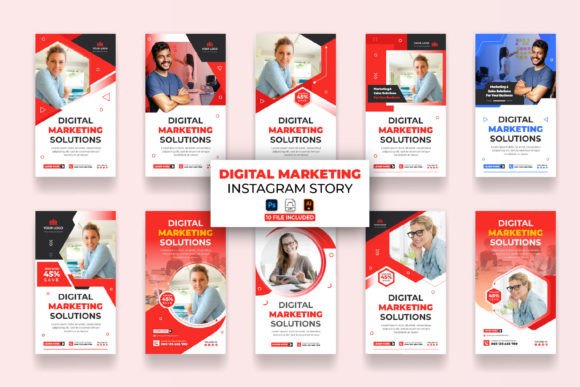
At its core, this kind of template package gives you a set of files designed to work at a 1080x1920 pixel dimension, which is the standard resolution for Instagram Stories. The files are provided in multiple formats — Adobe Photoshop (.psd), Adobe Illustrator (.ai), and Encapsulated PostScript (.eps) — each with layers, editable text, and placeholders for images. The color mode is RGB, and the resolution is 72 DPI, which is typical for screen-based content rather than print.
The key differentiator here is the level of customization. Unlike a static image or a locked template that only allows minimal tweaks, these files are meant to be opened and edited in Adobe software. You can change colors, swap in your own photos, adjust typography, and rearrange elements. The product also includes a help guide and a link to download the font used. That degree of flexibility is useful if you have someone on your team who knows the basics of Illustrator or Photoshop, but it also means you need that software and at least some familiarity with it.
In comparison, many online tools like Canva, Adobe Express, or Figma offer story templates that require no software installation and can be edited in a browser. Those are often faster to get started with, but they may not give you the same level of control over every vector shape, layer, or color profile. The Digital Marketing Agency Instagram Story template set sits in a middle ground — it demands more from the user but rewards them with more granular customization.
Comparing Template Approaches: File-Based vs. Cloud-Based Editors
If you are evaluating this product, it helps to understand the broader landscape of Instagram Story creation tools. Broadly, there are three common paths: using a cloud-based drag-and-drop editor, using a file-based template like this one, or designing from scratch in a professional application.
Cloud-Based Editors
Platforms like Canva, Adobe Express, or Visme offer hundreds of story templates that you can edit in a browser. They are often free or low-cost, require no installation, and allow collaboration with team members. The tradeoff is that you are limited to the features and elements the platform provides. You cannot freely adjust every vector path, and exporting at high resolution sometimes requires a paid plan. For a small business or a solo marketer, these tools work well. But for a digital marketing agency that wants precise brand control, the limitations can become frustrating.
File-Based Templates (This Product)
With a file-based template, you own the file. You can open it in Illustrator or Photoshop and change anything — every curve, every gradient, every layer. The Digital Marketing Agency Instagram Story package includes 10 files in each format, giving you a set of variations to work with. Because the files are editable in professional software, you can also repurpose elements for other projects, like Facebook covers or YouTube thumbnails. The main requirement is that you have Adobe CC installed and at least basic knowledge of how to navigate layers, fonts, and color swatches. If you do, the flexibility is substantial. If you do not, the learning curve may slow you down.
Designing from Scratch
The third option is to create stories entirely from scratch in Illustrator, Photoshop, or After Effects. This gives you complete freedom, but it also takes the most time. For an agency that produces multiple stories per week, starting from a blank canvas for each one is rarely efficient. A template like this one strikes a balance between speed and originality — you start with a structure and customize it to fit your brand.
Strengths of This Template Set
Several practical strengths make this product worth considering for a digital marketing agency or a business owner managing their own content.
- Multiple file formats: The inclusion of AI, EPS, and PSD means you can work in the software you prefer. EPS files are particularly useful if you need to open them in older or non-Adobe vector tools.
- Help guide included: A guide that explains how to edit the files reduces the learning curve, especially for someone who knows the basics but still benefits from step-by-step instructions.
- Font link provided: Font licensing can be a hassle. When the font is free and a download link is included, you avoid the time spent searching for matching typefaces.
- RGB color mode at 72 DPI: These settings are exactly what digital screens need. You won't have to convert color modes or worry about resolution mismatches.
- Customizable without limits: Because the files are layered and editable, you can adapt them to different campaigns, seasonal promotions, or client branding without having to start over.
Limitations and Tradeoffs
No template is perfect for everyone. Understanding where this product may fall short helps you decide if it fits your situation.
- Requires Adobe software: You need a subscription to Illustrator or Photoshop. If you do not already have it, the cost adds up. Alternatives like Canva or Figma are free or cheaper.
- Learning curve: While the basics of Illustrator can be learned quickly, anyone unfamiliar with layers, masks, or vector editing will need to invest time. The help guide helps, but it is not a full tutorial course.
- Design style: The template set has a particular aesthetic. If your brand uses very unconventional layouts or typography, you may need to modify the files extensively. The 10 included variations give you options, but they come from one design direction.
- 72 DPI is for screens only: This resolution is fine for Instagram Stories, but if you ever want to repurpose the design for print materials, you would need to recreate the file at 300 DPI. That is not a flaw of the product, but it is a limitation worth noting.
- No web-based collaboration: File-based templates require you to share files via email or cloud storage. If your team works entirely in a collaborative web platform, this workflow may feel slower.
Best-Fit Situations: Who Benefits Most from This Template
Based on the strengths and limitations, certain scenarios make this product a strong match.
Small to Mid-Size Digital Marketing Agencies
If you manage multiple clients and need to produce stories that look clean and professional, having a set of editable templates saves time. You can create a template for each client, adjust the colors and logo, and reuse the structure across posts. The Digital Marketing Agency Instagram Story set gives you 10 base designs, which can be enough to create a content library.
Freelance Social Media Managers
A freelancer who works with several brands may find these files helpful for maintaining a consistent look without hiring a designer. As long as you have Adobe software and basic skills, you can produce stories that look like they came from a larger agency.
Business Owners Who Prefer Hands-On Control
Some entrepreneurs enjoy customizing their own visuals. If you are comfortable opening Illustrator and changing text and colors, having a layered file is more satisfying than using a template where you can only adjust a few fields. The control over every element can make the difference between a generic looking story and one that truly represents your brand.
When You Might Consider an Alternative
There are also scenarios where this product may not be the best route.
- If you have no Adobe software or no intention of learning it: Cloud-based editors are a more practical starting point. They let you create stories immediately without a subscription fee or a learning curve.
- If you need animated stories: These files are static. For animated or video-based stories, you would need to look at After Effects templates or motion design tools. Many agencies now use short video clips or animated text, and a static template set would only cover part of that need.
- If you only produce stories occasionally: A single business owner who posts a story once a week might be better served by a simple mobile app like Unfold or Over. The investment of time to learn Illustrator may not be justified if the output is minimal.
- If you work in a team that uses collaborative design tools: Platforms like Figma let multiple people edit the same template in real time. A file-based template requires you to save, send, and manage versions manually.
Practical Use Cases and Examples
Let’s look at how a typical agency might use these templates in practice.
Imagine you manage social media for a boutique hotel chain. You need to post Instagram Stories daily featuring room photos, local attractions, and special offers. With the Digital Marketing Agency Instagram Story templates, you can create a consistent layout for each category: one template for room photos, one for dining, one for events. You swap out the image, update the text, and export. Over a month, you produce 30 stories using variations of the same 10 templates. The visual consistency reinforces the brand, and the time saved adds up.
Now consider a scenario where you are running a campaign for a tech startup. The brand uses bold colors and a modern sans-serif font. The templates come with a certain palette and typography, but you can change both in Illustrator. You adjust the colors to match the startup’s brand guidelines, import the correct font, and replace the placeholder images with screenshots of the product. The result looks custom, even though it started from a template.
On the other hand, if the startup wants animated transitions or interactive polls embedded in the story, a static template set would not cover that. You would need to add those elements manually in a tool like Canva or Storyly, or use an After Effects animation. Understanding the boundary between what a template provides and what you still need to build yourself is essential.
Decision Factors: Choosing the Right Resource for Your Needs
When you evaluate whether a Digital Marketing Agency Instagram Story template set is the right purchase, consider these questions:
- What software do you already have? If you already subscribe to Adobe CC, the barrier to using these files is very low. If you don’t, factor in the subscription cost.
- How much control do you need? If you want to adjust every detail, file-based templates are better. If you only need to change text and images, a web tool may suffice.
- How many stories do you produce? High volume makes templates more valuable. Low volume may not justify the setup time.
- Is brand consistency a priority? If you manage multiple brands or campaigns, having a set of reusable templates helps maintain consistency without repeating work.
- Do you need collaboration? If you work with a remote team, consider whether file sharing works for you or if you need a cloud-based solution.
Strengths at a Glance
To summarize the main advantages of this product: it offers editable files in multiple formats designed for the correct Instagram Story dimensions, includes a help guide and font link, and gives you control over layers and elements. For someone comfortable with Illustrator or Photoshop, it provides a reliable foundation for producing professional-looking stories without starting from zero each time.
Limitations at a Glance
The main tradeoffs are the need for Adobe software, the static nature of the design, the learning curve for beginners, and the lack of built-in collaboration or animation. For some users, these tradeoffs are acceptable. For others, they point toward a different tool.
Making an Informed Choice
Choosing a template for Instagram Stories is never about finding the single best product. It is about matching the tool to your workflow, your team’s skills, and your content needs. The Digital Marketing Agency Instagram Story template set described here works well for agencies and individuals who already use Adobe software and want more control than a web tool provides. It may not be the right fit if you need animation, collaboration, or a zero-learning-curve experience.
Take stock of your current process: how much time you spend on each story, what tools you already own, and how much customization you require. By comparing your needs against the features and tradeoffs described here, you can decide whether this kind of template is the practical upgrade you need or whether a different approach might serve you better. Either way, the goal remains the same: producing Instagram Stories that look polished, feel on-brand, and engage your audience effectively.