How a Cleaning Service Social Media Post Template Streamlines Your Brand Marketing
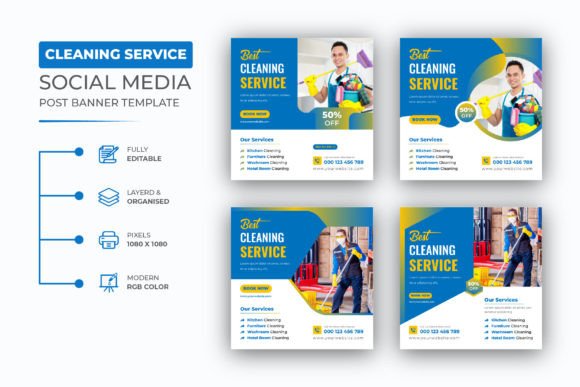
Building a consistent social media presence for a cleaning business takes more than before-and-after photos. It requires a system for creating polished, on-brand posts without starting from scratch every time. A well-designed Cleaning Service Social Media Post template offers exactly that—a repeatable framework that saves hours of design work while keeping your feed professional and cohesive.
For cleaning business owners, marketers, and freelancers managing multiple client accounts, a template set like this one (provided in editable AI and EPS files) becomes a practical tool for scaling content production. Instead of wrestling with design software each week, you focus on messaging, scheduling, and client engagement. The real value lies not in the template itself but in how it fits into your broader content workflow.
What This Template Set Actually Does
This is a set of four pre-built social media post designs created specifically for cleaning services. Each layout comes in two vector formats—AI and EPS—at 1080x1080 pixels in RGB color mode with 72 DPI resolution. The square format works natively on Instagram, Facebook, LinkedIn, and Pinterest, and the resolution is optimized for digital screens, not print.
The files are built in Adobe Illustrator CC. If you have basic familiarity with Illustrator—changing text, swapping colors, replacing images—you can customize every element. A help guide is included, and the font used is free with a download link provided inside the main file. This means you don’t need to hunt down licenses or match fonts manually.
What this really provides is a starting point for your visual identity. Instead of designing a post from a blank canvas each week, you edit the template and export. That shift—from design mode to editing mode—is what makes a template set a workflow accelerator.
Before Launch: Setting Up Your Visual Foundation
Before you start posting regularly, take time to customize the template to your brand. This is where the editable AI and EPS files shine. Open the file in Illustrator, and adjust the following elements to match your business identity:
- Colors – Replace the default palette with your brand colors. Cleaning businesses often lean toward blues, whites, greens, or soft neutrals. Stick to two or three main colors to keep the feed clean.
- Fonts – The template uses a free font, but you can swap it for your preferred typeface. Choose a clean, readable sans-serif for body text and something slightly more distinctive for headlines.
- Images – Replace placeholder photos with your own before-and-after shots, team photos, or styled cleaning scenes. High-quality, well-lit images make the biggest difference.
- Logo placement – Add your logo to a consistent position across all four layouts. This builds brand recognition over time.
Once you’ve done this initial setup, you have a reusable asset library. Each week, you duplicate the file and update the text and image layers, keeping your brand assets intact. This upfront investment of an hour or two pays back every time you create a post.
During Content Creation: Integrating with Your Scheduling Workflow
A template doesn’t replace the need for a content plan—it makes executing that plan faster. Here is how it fits into a typical weekly content workflow for a cleaning service:
- Plan your posts – Decide what you will publish this week: a before-and-after, a testimonial, a service spotlight, a seasonal tip, or a team introduction. Slot these into a content calendar.
- Gather your assets – Collect the photos, testimonials, or tips you need for each post. Keep a folder of approved images so you aren’t searching last minute.
- Open the template – Duplicate the master AI or EPS file for each post. Because the file is layered, you can hide or show elements depending on the layout you choose.
- Edit text and images – Replace placeholder text with your post copy. Swap out the image. Adjust colors if needed for the specific post theme.
- Export – Save each post as a PNG or JPG at 1080x1080 pixels. The 72 DPI resolution keeps file sizes small for fast uploads without losing quality on screens.
- Schedule or post – Upload to your social media management tool or directly to the platform.
This process turns what could take 30–45 minutes per post into 5–10 minutes. For a business posting three times per week, that saves roughly two to three hours per week—time you can reinvest in client communication, service delivery, or marketing strategy.
After Posting: Maintaining Consistency Across Platforms
Consistency matters more than any single post. When your feed uses the same template structure, the same colors, and the same font treatment, your audience starts recognizing your content before they read the caption. This is brand equity built through repetition.
The template also makes it easier to repurpose content across platforms. The 1080x1080 square format works natively on Instagram and Facebook, but you can also repurpose the same design as a LinkedIn update or a Pinterest pin. For LinkedIn, you may want to adjust the text to be more professional. For Pinterest, add a vertical text overlay describing the cleaning tip. Having a base template means you are never starting from zero for any platform.
How This Template Interacts with Other Tools and Resources
A template file does not exist in a vacuum. It works best when paired with other elements of your marketing system:
- Social media scheduling tools – Once exported, post images can be uploaded to platforms like Buffer, Hootsuite, Later, or Meta Business Suite. Batch-creating posts for the week and scheduling them in one session is a common workflow.
- Content management systems – For cleaning businesses that also blog or maintain a service page, template images can be reused on the website as feature images or in-service galleries.
- Email marketing – Square template images can be resized for email headers or used in newsletters to showcase recent work or promotions.
- Client reporting – If you create social media reports for clients or for your own tracking, the template helps maintain a consistent visual identity across those reports.
The file formats also matter here. AI and EPS are vector-based, which means they are scalable without losing quality. If you ever need to resize a post for a different platform or print it as a flyer for a local event, you can do so without starting over. The 72 DPI resolution is standard for web use, but if you need higher resolution for print, you can increase DPI in Illustrator.
Practical Implementation Tips for Cleaning Businesses
Based on working with service-based brands, here are specific ways to get the most out of this template set:
Build a Content Library Around the Template
Create a folder system that mirrors your four template layouts. For each layout, keep a subfolder with relevant images. For example:
- Layout 1 – Before-and-after shots
- Layout 2 – Customer testimonials (with permission)
- Layout 3 – Service spotlights (deep cleaning, move-out, commercial, etc.)
- Layout 4 – Seasonal tips or team introductions
This structure means you are never scrambling for assets when it is time to create a post. You open the template, pull from the right folder, and edit.
Create Post Variations from One Template
Because the file is layered, you can create multiple variations of the same layout by toggling visibility. For instance, one layout might have a text overlay on the left side. You can flip the composition or swap in a different background image to create a fresh look without redesigning. This extends the lifespan of each template before you need to refresh your design.
Use the Help Guide as a Training Resource
If you have an assistant, a virtual assistant, or a team member handling social media, the included help guide becomes a training document. Walk them through the basic edits: changing text, replacing images, and exporting. Within one session, they can take over production while you focus on strategy and client work.
Test Before Rolling Out
Post one or two test images from the template to your feed. Check how they look on mobile and desktop. Compare them with your existing posts. If the template feels too different from your current aesthetic, adjust the colors and fonts in the AI file until it blends naturally. You want the template to enhance your feed, not clash with it.
Plan a Quarterly Refresh
Trends in cleaning service marketing shift. Maybe you add a new service, update your logo, or want to rotate in a seasonal color. Because the files are fully editable, you can do a quarterly refresh in under an hour. Open the master file, update the color palette or font, and re-export your core templates. This keeps your feed looking current without a full redesign.
Usability and Compatibility Considerations
Before downloading, confirm that you have access to Adobe Illustrator CC or a compatible vector editor. AI files are native to Illustrator, and EPS files can be opened in many vector programs including CorelDRAW and Affinity Designer. If you work on a team, make sure everyone has a way to open and edit the files without conversion issues.
The templates use free fonts with a download link included. Install the fonts before editing to avoid missing font warnings. If you prefer to use a different typeface, simply select the text layers and apply your own font. This is a straightforward process even for beginners.
The 1080x1080 pixel dimension is the standard for Instagram square posts and works well on Facebook and LinkedIn. If you need portrait or landscape sizes, you can adjust the canvas size in Illustrator, but be aware that the design layout may need repositioning. The help guide likely covers this, but plan extra time for resizing the first time you do it.
Long-Term Value and Consistency
The real return on a template set like this comes from repeated use. Each time you open the file, you save 20–30 minutes of design time compared to building a post from scratch. Over a year of posting three times per week, that adds up to roughly 50–75 hours saved. Those hours are better spent on improving your cleaning service, training your team, or developing new marketing strategies.
Consistency also affects how your audience perceives your business. A cleaning service that posts polished, recognizable content signals professionalism and attention to detail—exactly the qualities customers want in a service provider. The template becomes a silent endorsement of your work ethic.
For marketers managing multiple cleaning clients, this template set allows you to standardize production across accounts. Each client gets their own branded version of the template, but you use the same workflow. This reduces cognitive load and speeds up delivery times.
If you need help customizing the file or have specific questions about adapting the design for your business, the template creator offers support through their profile. This is a practical safety net if you run into issues during setup.
At its core, a cleaning service social media post template is not about design—it is about efficiency. It takes the repetitive, creative work of building posts and turns it into a repeatable process. When you reduce friction in your content production, you post more consistently, and consistency drives results over time.