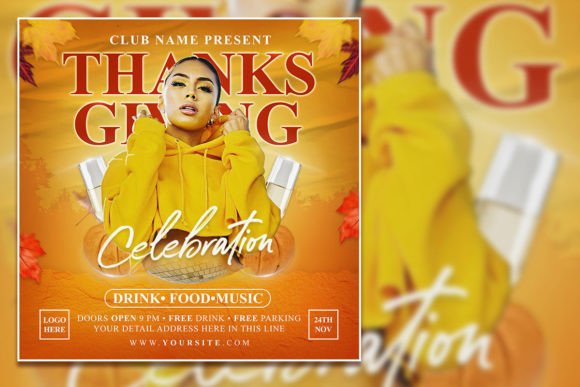
Thanksgiving Celebration Social Media: How Editable Flyer Templates Bring Your Holiday Posts to Life
You're scrolling through your feed during the week of Thanksgiving, and suddenly every brand, local bakery, and community group is posting the same generic turkey emoji and "Happy Thanksgiving" text. It's easy to blend in—but you don't want that. Whether you own a small business, run a nonprofit food drive, or just want your family's Friendsgiving invite to feel special, your Thanksgiving social media posts deserve more than a hasty photo and a caption. That's where an editable Thanksgiving flyer template comes into play. It’s a ready-to-customize PSD file (2000 x 2000 pixels, 300 dpi, RGB mode) that you can open in Adobe Photoshop, swap the placeholder photo for your own, change the text with a few clicks, and have a polished, professional-looking post in minutes.
But a template is only as good as the way you use it. Below, we’ll walk through real situations where a customizable Thanksgiving flyer can save you time, keep your brand consistent, and actually connect with the people you’re trying to reach. No dry feature lists—just practical ways this simple tool can make your holiday messaging better.
When Your Business Needs a Last-Minute Thanksgiving Promotion
It's the Tuesday before Thanksgiving, and you realize your café hasn't posted anything about your holiday special: pumpkin spice lattes with a free cookie for customers who bring in a canned good for the local shelter. You need something on Instagram by tomorrow morning. You could design from scratch in Canva, but your brand colors, fonts, and logo are already set up in a Photoshop template you've used before. That's the beauty of an editable PSD template—you open it, replace the stock photo with a warm shot of your latte art, and edit the headline text to read "Give Thanks, Give a Can, Get a Cookie." The organized layers let you tweak the background color to match your fall palette without messing up the layout. In fifteen minutes, your post is scheduled.
This scenario is common for local shops, restaurants, and service providers who don’t have a dedicated designer. Instead of fighting with design tools, you focus on the offer. The template’s high resolution (300 dpi) also means you can print flyers for in-store signage without losing quality—no extra work.
Nonprofits and Community Groups: Spreading the Word Without the Design Hassle
A food bank organizing a Thanksgiving distribution drive needs a social media post that conveys urgency, warmth, and clear logistics. The audience is broad: potential donors, volunteers, and families seeking help. You need the flyer to feel inclusive, not corporate. With an editable Thanksgiving flyer template, you can replace the stock photo with a real picture from last year's event—showing volunteers sorting donations—which immediately builds trust. The text layers let you add the date, time, location, and a short call to action like "Help us make sure every table has a full plate."
Because the template comes in PSD format, you can also create multiple versions for different platforms: square for Instagram, slightly cropped for Facebook, and a vertical crop for story highlights. The file’s organized layers make that kind of resizing simple. A common limitation is that Photoshop is required—so if your team doesn’t have a licensed copy, you may need a volunteer who does. But once that person sets up the base design, anyone with basic Photoshop skills can swap text and images for future campaigns.
Event Planners and Churches Hosting a Community Thanksgiving Meal
You’re organizing a free community dinner at your church or community center. The event needs to reach families who might not have internet access to traditional flyers, so you’ll share the post in local Facebook groups, on Nextdoor, and maybe even print a few to put in laundromat windows. The Thanksgiving social media post template you’ve purchased allows you to keep one design for both digital and print. The 2000 x 2000 pixel canvas at 300 dpi means it prints beautifully at 8x8 inches. You can edit the text to highlight that the meal is free, include the start time, and add a note about parking. The straightforward layout—large photo, bold title, clean text areas—makes it easy for people to scan and get the information.
A key observation: many editable flyer templates come with placeholder photography that may not represent your community’s diversity or setting. The strength of this template is that you can replace the photo with your own. Doing that makes the flyer feel less stock and more authentic. One church I worked with swapped the generic family photo for a picture of their own volunteers serving at the previous year’s dinner, and engagement on the post tripled. People recognized faces and felt more inclined to come or help.
Homeschool Co-ops and Classroom Celebrations
Parents organizing a classroom Thanksgiving party often need a quick way to communicate with other families. Instead of a plain text post in a private group, a Thanksgiving editable PSD template can turn heads. You can use the flyer to list items needed for the feast (paper plates, apple cider, a sign-up for pies). The bright, festive design draws attention in a sea of text posts. Because you can edit the font (the template uses text layers that are easy to select and replace), you can match the school’s or group’s preferred style. And if you’re using the flyer just for social media, you don’t even need to worry about print resolution—it works perfectly on mobile screens.
One practical consideration: some parents aren’t comfortable with Photoshop. If that’s the case, you can edit the PSD on a friend’s computer or use a free trial of Photoshop. The template description notes that you only need to “select text with text tool and replace your text,” which is about as beginner-friendly as it gets. Still, if you’re not familiar with layers or swatches, it’s worth watching a quick tutorial. The payoff is a cohesive, professional flyer that stands out in a busy Facebook group.
Personal Use: Friendsgiving Invites and Family Reunion Posts
Not every use is business-related. Maybe you’re hosting a Friendsgiving and want an invite that looks more thoughtful than a text. Download the Thanksgiving flyer template, swap the photo for a picture of your table last year (or a fun group selfie), and edit the text to say “You’re invited: Friendsgiving at our place, November 23 at 5 PM, bring your favorite dish.” Share it in your group chat or as an Instagram story. Because the template is 2000 x 2000 pixels square, it fits perfectly in an Instagram post and leaves a clean look in stories when you resize slightly. You can even use the same file to make a printed card for friends who still like paper.
A strength here is that the template doesn’t force you into a corporate tone. The design can feel warm and personal if you choose the right photo. The potential limitation? If you’re not comfortable with design, you might stick with the default colors and layout, which could still look beautiful but won’t feel uniquely yours. However, the “editable” part gives you the power to change that. Even a small tweak—like changing the background from a dark orange to a soft cream—can make the flyer feel more personal.
Key Considerations Before Buying a Thanksgiving PSD Template
Before you click download, think about the editable Thanksgiving flyer template you’re getting. Most templates come as a single PSD file with organized layers. That’s a huge plus if you want to edit specific elements without ruining others. But you do need Adobe Photoshop (at least a trial version) to open and edit it. If you only have free design tools like Canva or Photopea, the PSD format may be tricky to handle. Some PSD files work in Photopea, but not all—so check the product description. If you’re buying this specific template, it’s designed for Photoshop, which remains the industry standard for deep customization.
Another thing: resolution. 300 dpi at 2000x2000 px is excellent for both screen and print. But if you only need digital use, you could technically resize down, though that’s not necessary. The high resolution means your social media images look crisp on retina displays. For print, you can produce small flyers (like 5x5 inches) without losing quality. Just know that if you plan to print poster-size (24x24 inches), this template may not hold up—the pixel dimensions aren’t large enough for big banners.
One more practical point: the template includes a placeholder photo. You’re encouraged to replace it with your own for a customized look. The stock photo that comes with it might be high-quality and generic—useful for quick posts—but if you’re promoting a specific event or business, your own imagery will always perform better. The template’s layout is designed so that the photo area is prominent, which lets the image do most of the emotional heavy lifting. Choose a photo that matches your message: warm, candid, food-focused, or community-oriented.
Making Your Thanksgiving Social Media Feel Genuine
Ultimately, the Thanksgiving celebration social media post you create is about more than aesthetics. It’s about helping your audience feel something—gratitude, anticipation, connection. An editable template gives you a head start on design, but the words, image, and offer are still yours. Use the template to remove friction, not to replace your voice. If you’re a restaurant owner, show the actual dish you’re proud of. If you’re a nonprofit, show the real people you serve. If you’re a friend hosting dinner, show the messy happy kitchen that makes your Friendsgiving special.
Flyer templates are tools. They work best when you treat them as starting points. The organized layers in a PSD mean you can adjust the color of a leaf shape, swap the headline font, or even remove elements entirely. Don’t be afraid to experiment. A flyer that’s too “stock” can feel distant; a flyer that’s too chaotic can be hard to read. The sweet spot is somewhere in between—where the structure holds your content steady, but the content feels human and specific.
Thanksgiving social media posts often compete with a lot of noise. A well-designed, customized flyer helps yours get noticed. And because you can edit every part, you can reuse the template year after year for different purposes: a gratitude challenge, a pie sale, a volunteer sign-up. That kind of longevity makes it more than a one-off—it becomes a reliable asset for your holiday communications.