Halloween Kids Party Flyer Design Guide
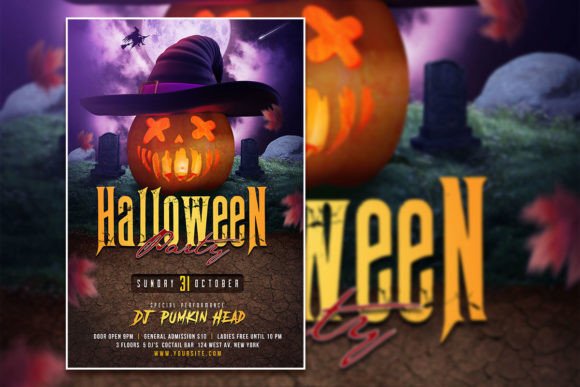
Planning a Halloween celebration for children means balancing spooky fun with age-appropriate warmth. The right promotional material sets the tone before anyone walks through the door. An editable Halloween flyer template provides a head start, letting you focus on the creative details that make your event feel personal and well-executed. Whether you are organizing a school carnival, a neighborhood gathering, or a themed birthday party, the visual announcement is your first opportunity to build excitement.
The format described here—a 2000 x 3000 pixel PSD file at 300 dpi with organized layers—offers substantial flexibility. Layered Photoshop templates keep text, imagery, and background elements separate, so you can adjust colors, swap fonts, and replace stock photos with your own pictures. This technical foundation supports a wide range of creative directions without requiring advanced design skills. Below, we explore practical ways to adapt such a template for different audiences, contexts, and communication goals.
Understanding the Template Structure
A well-organized PSD file typically includes groups for background, decorations, text overlays, and image placeholders. When you open the file in Adobe Photoshop, each element sits on its own layer, making it straightforward to isolate and modify specific parts. The 300 dpi resolution ensures print-ready quality for standard poster sizes, while the RGB color mode works equally well for digital use on social media, email newsletters, or event pages.
For those unfamiliar with layer-based editing, the workflow is intuitive:
- Text layers can be activated with the Text tool; simply highlight the existing wording and type your own copy.
- Image placeholders often appear as smart objects. Double-click the layer thumbnail, insert your photo, save, and the template updates automatically.
- Color overlays and adjustment layers let you shift the entire mood—from bright and playful to dark and mysterious—without affecting the original artwork.
This structure means you can reuse the same template for multiple events by swapping photos and updating details, saving time while maintaining a consistent visual identity.
Adapting for Different Audiences and Goals
Not every Halloween party targets the same age group or tone. The template you choose should reflect the specific experience you are offering. Below are three distinct directions, each suited to a different type of event.
Playful and Whimsical for Young Children
For toddlers and early elementary kids, the emphasis should be on friendly imagery and bright colors. Replace the stock photo with a candid shot of a smiling child in costume, or use a group photo from a previous year’s event. Adjust the color palette toward oranges, purples, and soft greens rather than deep blacks and reds. Change the font to a rounded, easy-to-read style. The text might read “Trick-or-Treat Trail” or “Costume Parade & Craft Corner.” Keep the layout uncluttered so parents and children can quickly absorb the date, time, and location.
A practical example: A local community center used a similar editable template to promote a “Halloween Morning Meetup” for preschoolers. They replaced the default spooky graphic with a cartoon pumpkin, used a warm orange background, and included a call-to-action for parents to RSVP. The flyer was posted both on a community bulletin board and shared in a neighborhood Facebook group. The layered file made it easy to crop and resize the same design for a square social media post without rebuilding anything from scratch.
Cool and Creative for Grade-School Parties
Children ages six to twelve often appreciate a sense of mild adventure without being overwhelmed. Consider a design that leans into classic Halloween motifs—stars, silhouettes of bare trees, a subtle moon—but keeps the color palette slightly muted. Use the photo placeholder to show a group of kids engaged in an activity like pumpkin decorating or a scavenger hunt. The text should highlight interactive elements: “Monster Mash Dance Party,” “Glow-in-the-Dark Scavenger Hunt,” or “DIY Costume Contest.”
In this context, the template’s organized layers become especially useful. You can duplicate the background layer, apply a gradient map, and create a darker version for a printed poster while keeping a lighter version for a digital invitation. The ability to edit text independently means you can add a secondary language version or include a QR code linking to a permission slip without disrupting the visual flow.
Family-Friendly Neighborhood Block Parties
When the audience spans multiple age groups—toddlers, school-age kids, teens, and adults—the flyer must communicate broad appeal. Use a design that balances festive decoration with clear logistical information. Replace the stock photo with an aerial shot of decorated houses or a wide shot of the block party setup. Emphasize inclusivity with phrases like “Everyone Welcome” or “All Ages.” Add bullet points listing activities: a bounce house, a face painting station, a hot cider table, and a costume contest with categories for different age brackets.
The template’s 2000 x 3000 pixel canvas works well for both print and digital distribution. You can export a full-resolution version for local print shops and a compressed JPEG for email blasts and social media. Because the file is fully editable, you can also create a series of countdown posts by duplicating the PSD and updating only the text layer with “3 Days Until the Block Party” or “Weather Update: In case of rain, we move to the community center.”
Creative Variations and Style Approaches
Beyond audience adaptation, the template invites stylistic experimentation. The following approaches show how different design choices change the message and emotional tone.
Vintage Halloween Appeal
Use a desaturated orange and teal palette combined with serif fonts to evoke mid-century Halloween decorations. Replace the modern stock photo with a sepia-toned image of classic jack-o-lanterns or paper cutout decorations. This style works particularly well for events that include retro activities like apple bobbing, a hayride, or a vintage costume contest. The result feels nostalgic and grounded, appealing to parents who remember similar celebrations from their own childhood.
Minimalist and Modern
A clean, minimalist approach uses plenty of negative space, a single focal image, and restrained typography. Choose one strong photo—perhaps a child in a simple ghost costume holding a lantern—and let it dominate the canvas. Use a dark background with white or pale orange text. This style communicates sophistication and is well-suited for private parties, boutique classroom events, or small gatherings where the guest list is exclusive. The layered template makes it easy to hide decorative elements you don’t need, keeping the design crisp and uncluttered.
Illustration-Driven Fantasy
If you have access to illustrated assets or a custom drawing, swap the photo entirely for an illustrated scene. The template’s image placeholder can accept vector artwork or a high-resolution digital painting. This approach works well for storybook-themed parties, such as a “Nightmare Before Christmas” viewing party or a “Harry Potter Halloween.” Because you control the background layers, you can composite multiple elements—a castle, a forest path, floating lanterns—into one cohesive scene. The result feels original and immersive, setting your event apart from standard store-bought decorations.
Practical Recommendations for Consistent Results
Whether you are creating a single flyer or a series of promotional materials, a few habits help maintain quality and efficiency.
- Work with copies of the original PSD. Keep the unedited template as a master file. Duplicate it for each new project so you can always return to the base design.
- Use consistent fonts. Choose two typefaces—one for headlines and one for body text—and stick with them across all materials. This builds visual coherence even when layouts differ.
- Proofread text layers before exporting. Because text is fully editable, it is easy to accidentally leave placeholder wording in place. Review each layer individually, especially after swapping in new event details.
- Export multiple versions for different platforms. A 2000 x 3000 pixel canvas at 300 dpi is ideal for print, but social media requires different aspect ratios. Use Photoshop’s Export As feature to create square (1080 x 1080) versions for Instagram, landscape (1920 x 1080) versions for Facebook headers, and vertical (1080 x 1350) versions for Pinterest or sharing in stories.
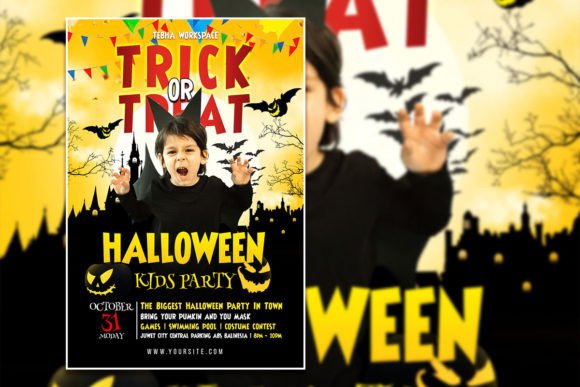
- Replace the sample photo with your own. The template description emphasizes that you can substitute your own image for a more customized look. This single change does more to personalize the flyer than any other adjustment. A photo of your actual venue, your child in costume, or a previous event makes the invitation feel immediate and real.
Balancing Inspiration with Practical Execution
The value of an editable Halloween flyer template lies not in its default appearance, but in how easily it adapts to your specific vision. The layered structure, organized folders, and editable text eliminate repetitive setup work, freeing you to concentrate on the creative decisions that matter: choosing a color palette that matches your party theme, selecting a photo that captures the energy you want, and wording your call-to-action clearly.
For a small business owner organizing a storefront trick-or-treat event, the template becomes a branding opportunity. Insert your logo into a corner, use your brand colors for accents, and include a discount code for costume accessories. For a teacher coordinating a classroom party, the same template can include a list of needed volunteers and a link to a sign-up sheet. For a parent hosting a backyard gathering, it becomes a simple, warm invitation that friends look forward to receiving.
The 300 dpi resolution and generous canvas size ensure that whatever direction you choose, the final output remains sharp and professional. Whether you print a single poster for a community board or share a digital version across multiple social channels, the template holds up. And because every element can be edited, you are never locked into a design that does not quite fit your event.
Keeping the Process Audience-Focused
Every design decision should serve the people who will see the flyer. Parents scanning a busy bulletin board need to find the date, time, and location in three seconds. Caregivers scrolling through a social media feed need a visual that stops them long enough to read the caption. Kids themselves respond to familiar characters and bright colors, but the adults making the decisions appreciate clarity and professionalism.
By using a layered, editable template, you address both audiences. The visual appeal draws children in, while the structured layout and clear typography reassure adults that the event is organized and worth attending. The ability to replace the photo with your own image adds a layer of authenticity that generic stock art cannot match. This combination of flexibility and polish makes the template a practical tool for anyone who needs to produce a Halloween announcement quickly, without sacrificing quality.
Start with the template as a foundation, then tailor every element—color, image, text, layout—to reflect the unique character of your event. The result will be a flyer or poster that feels intentional, inviting, and ready to generate the kind of Halloween magic you want to share.