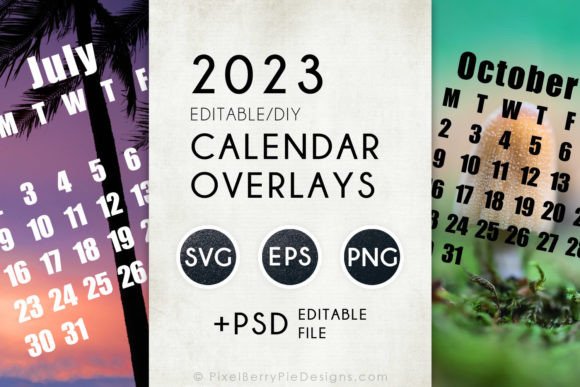
2023 Vector Calendar Overlay Templates: A Practical Tool for Creators, Marketers, and Small Business Owners
If you’ve ever sat down to design a calendar for a client project, a social media campaign, or even just your own home office, you know the drill. You find the perfect background image, you settle on a font, and then you realize you need to place a clean, readable calendar grid on top of it. Suddenly you are hunting for a transparent calendar overlay, hoping it matches your aspect ratio, and praying you don’t have to manually draw each day square. That exact frustration is what makes 2023 Vector Calendar Overlay Templates such a useful resource to have on hand. Whether you need a single month for a quick Instagram post or all twelve months for a printed wall calendar, having a set of pre-made, editable calendar months in formats like SVG, EPS, PNG, and PSD changes the entire workflow.
Let me walk you through what this download actually includes, because the description is straightforward but the real value lies in the situations where you will use it. The package gives you one full set of pre-made calendar months in EPS vector format, one full set in SVG vector format, and one full set in PNG format at 1200 by 1275 pixels. On top of that, there is a single PSD file that contains all calendar months, each on its own editable text layer. So if you want to keep the basic grid but swap out the font, change the size of the numbers, or adjust the spacing, you can do that directly in Photoshop. This is not a locked-down template. It is meant to be adapted, customized, and dropped into your own designs.
Who Actually Uses Calendar Overlays Like This
The short answer is anyone who needs to communicate dates visually. But let us break that down into real scenarios, because knowing the why helps you decide if this kind of resource fits your work or personal projects.
Content creators and social media managers
If you run an Instagram account, a blog, or a YouTube channel, you have probably seen other creators post content calendars or “what’s coming this month” graphics. Those clean, branded calendar posts take planning. With the 2023 Vector Calendar Overlay Templates, you can take your brand colors, maybe a seasonal photo, and place the SVG or PSD calendar month right on top. Because the text layers are editable, you can even highlight important dates, change the language, or adjust the styling to match a campaign. Instead of rebuilding a calendar grid from scratch every month, you reuse the same base file and just update the content. That alone saves hours over the course of a year.
Print-on-demand sellers and small product creators
Selling printable planners, desk calendars, or even custom wall calendars on platforms like Etsy requires a polished product. Buyers expect a clean layout and consistent design across all twelve months. The vector formats in this download are especially useful here. Working in EPS or SVG gives you infinite scalability, so if you want to print a desk tent calendar at 5 by 7 inches or a large wall poster at 18 by 24 inches, the grid stays sharp. You do not lose resolution. The PNG version also gives you a quick preview layer to test layouts without opening a vector program. For someone running a small print shop or a side hustle selling digital downloads, having all months pre-structured in one PSD file means you can design once and export variations quickly.
Educators and classroom organizers
Teachers often need classroom calendars for bulletin boards, parent newsletters, or lesson planning handouts. The practical reality is that most educators are not graphic designers. They need something that works, that they can edit without a steep learning curve. The PSD file with editable text layers is a lifeline here. You can open it in Photoshop, type in school holidays, field trips, or testing dates, and print directly. If the school uses specific dates or a different start day for the week, you can adjust the layout. The vector formats also make it easy to resize the calendar for a half-page handout or a full bulletin board print. For educators who also design materials for their own classroom businesses, this download removes the repetitive work of building a grid each time.
Practical Use Cases That Go Beyond the Obvious
Most people think of calendars as a simple visual aid, but once you have a flexible overlay template, you start seeing more creative applications. The DIY 2023 Vector Calendar Months aspect of this download is what unlocks a lot of those scenarios, because you are not forced to use the default text. You can modify it.
Marketing content for local businesses
A coffee shop, a gym, or a library often posts monthly event schedules on social media or their website. Instead of hiring a designer each month, an owner or employee can take the PSD file, paste the shop logo at the top, add open mic nights or fitness class dates, and export a clean graphic. The 1200 by 1275 pixel PNG size is already close to standard social media dimensions, which means minimal cropping. With the SVG format, the same calendar can be placed on a website as a responsive graphic. For a bakery advertising seasonal promotions or a bookstore listing author visits, the ability to edit the text layers directly removes friction from the process.
Personal planning and home organization
Not everyone uses this for business. Some people just like having a physical calendar in their kitchen or home office that matches their decor or highlights family events. With the vector files, you can take a favorite photo from a trip or a piece of digital art you bought and drop the calendar overlay on top. You can print it at home or take it to a local print shop. Because the months are all included, you can create a full-year set in one sitting. The editable text layers also mean you can write in your own notes before printing, like “anniversary,” “trash pickup day,” or “kids’ spring break.” This kind of personal customization is easy when the base template is designed for edits.
Ebook and course creators
If you sell digital planners, productivity courses, or year-long challenge guides, you often need to include a calendar layout inside the PDF or inside the course platform. Having the calendar months in both vector and PNG gives you options. You can insert the PNG directly into a layout without worrying about missing fonts, or you can open the EPS in Illustrator, adjust the design to fit your branding, and place it in a larger document. The fact that all months share the same layout means consistency across your product. For a course that runs from January to December, participants will see a uniform design that builds trust and professionalism.
What to Consider Before You Use the Templates
Even with a well-prepared download, there are a few things to think about so you get the best result for your specific project. Practical considerations make the difference between a calendar that looks like an afterthought and one that feels integrated into your design.
Format choice matters depending on your editing tool
If you only have a web browser and basic photo editing software, the PNG files are probably your best starting point. You can place them on top of an image and they work as a transparent overlay. If you use Adobe Illustrator, CorelDRAW, or any vector editing tool, the EPS or SVG files give you full control over colors, stroke weights, and scaling. The PSD file obviously requires Photoshop, but it gives you the added benefit of editable text without recreating the grid. Think about which software you actually use before you open the files. That will save you time.
The grid is pre-made, but you still need to check alignment
Since this is a template, the days of the week and the date numbers follow a standard 2023 layout. But depending on your final application, you might want to adjust spacing. For example, if you are creating a wall calendar that includes space for daily notes, you might want larger squares. The vector formats let you stretch or modify the grid, while the PNG is fixed at 1200 by 1275 pixels. If you need a different aspect ratio, the SVG or EPS is the way to go. Take a moment to measure your output size before committing to a format.
Font licensing and text layers
The PSD file includes editable text layers, which means you can change the font to something that matches your brand or personal style. But keep in mind that if you plan to sell or distribute the final calendar, the fonts you choose should be properly licensed for commercial use. The template itself does not include custom fonts, so you control that part. This is actually a benefit, because you are not locked into a font you dislike. You just replace the text with your own typeface.
Connecting Features to Real Outcomes
Let me give you a concrete example. Suppose you are a freelance event planner. You send monthly newsletters to your clients with upcoming industry gatherings, deadlines, and promotion windows. You want the newsletter to look professional but you also need to produce it quickly between events. Using the 2023 Vector Calendar Overlay Templates, you open the PSD file, replace the placeholder month names and numbers with your own dates, drop in a relevant photo from the last event, and export a JPEG for your email. The whole process takes under fifteen minutes. The alternative would be drawing a table in a word processor or manually placing text boxes in a design app, both of which take longer and often result in a less polished visual.
Another scenario: You run a small online shop selling digital scrapbooking kits. Your customers love including calendar pages in their memory books. Instead of designing a calendar from scratch for each new kit, you use the SVG vector files as a base. You recolor them to match the kit theme, add decorative elements around the border, and include the file as a bonus in your product. The vector format means your customers can also resize the calendar to fit their specific scrapbook page sizes. This adds value to your product without requiring a major time investment from you.
Why This Download Works for Multiple Skill Levels
One of the reasons this kind of resource gets used across so many different fields is that it accommodates different comfort levels with design software. A beginner can grab the PNG file, drop it into Canva or a simple photo editor, and have a functional calendar in minutes. An intermediate user can open the PSD, tweak the text and colors, and add background images. An advanced designer can take the EPS file into Illustrator and completely rework the grid, adjust spacing, align it to a custom artboard, and pair it with complex branding. The same download serves all three levels of experience because the formats and file structure are built to be flexible rather than restrictive.
That flexibility is often the difference between a template that collects digital dust and one that becomes a go-to resource throughout the year. When you know you can grab the January SVG, drop it into a design, and not worry about font compatibility or resolution, you save mental energy. And when you need to produce February, you already know exactly where everything is in the file, so the second month takes half the time of the first.
Final Thoughts Before You Start
If you are considering picking up this download, think about where you will actually use it first. Do you produce content that involves dates? Do you sell products that include a calendar component? Do you manage events, classes, or social media calendars? If any of those apply, having a vector-based calendar overlay in multiple formats removes a repetitive design task from your to-do list. The pre-made months give you a head start, and the editable PSD gives you room to make it your own without starting from a blank grid.
The DIY 2023 Vector Calendar Months are not just a set of files. They are a time-saving tool that lets you focus on the creative parts of your project instead of the repetitive layout work. Whether you use the PNG for quick social posts, the SVG for responsive web use, the EPS for print-ready designs, or the PSD for detailed custom edits, you end up with a finished product that looks cohesive and intentional. And really, that is the whole point of using a template in the first place.