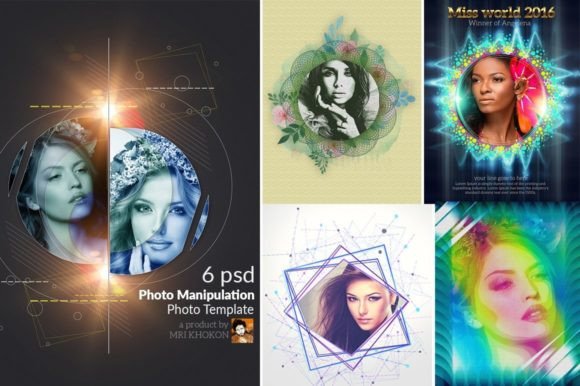
Photo Manipulation PSD Templates: A Strategic Tool for Visual Communication
Visual content is no longer optional. Whether you are building a brand, launching a campaign, or simply trying to hold someone's attention online, the quality and speed of your imagery can determine whether your message lands or gets scrolled past. Photo Manipulation PSD Templates offer a structured way to produce professional, layered visuals without starting from scratch. But like any creative tool, their real value depends on how thoughtfully you use them. This article explores what these templates are, why they matter for decision-makers and creators, and how to integrate them into a purposeful workflow rather than just applying effects for the sake of it.
Understanding Photo Manipulation PSD Templates
At their core, Photo Manipulation PSD Templates are pre-built Photoshop documents that allow you to insert your own images into a carefully designed composition. The template handles the heavy lifting: lighting, texture, color grading, depth, and arrangement. You bring the subject. The result is a manipulated photograph that looks like it was crafted by a skilled digital artist.
These templates typically include multiple layers, smart objects, adjustment layers, and grouped folders. The one described here comes with six PSD files, each at 3000×4000 pixels, RGB color mode, and 300 DPI. That resolution makes them suitable for both digital use and print. With 100 editable layers, smart object placement, and organized groups, the template behaves much like a high-end mock-up. You double-click a smart object, paste your photo, save, and the composition updates automatically.
What sets this apart from a simple filter or preset is the depth of control. You can adjust the artistic look, change paper textures, modify color effects, toggle auto filters, and even rearrange elements if needed. The result is not a one-click output but a starting point that you can steer toward your specific visual goal.
Why Photo Manipulation PSD Templates Are Strategically Useful
In a professional context, time is often the scarcest resource. A template compresses hours of manual compositing into minutes. That alone makes it attractive. But the strategic value goes deeper than speed.
Consistency Across Visual Assets
When you use the same template family for multiple images, you create a coherent visual language. This matters for branding. If your social media graphics, web banners, and print materials all share the same lighting, texture, and color mood, your audience starts to recognize your output before they even read the text. Templates enforce a baseline quality that manual ad-hoc editing often lacks.
Lowering the Barrier to Advanced Techniques
Not every entrepreneur or small business owner has the time to master layer masks, blending modes, or color grading. A well-built PSD template democratizes access to these techniques. You can achieve a professional artistic look without a formal background in digital art. This levels the playing field for smaller teams and independent creators who need to compete with larger, well-funded marketing departments.
Predictable Output for Planning
When you plan a campaign, you need to know what your visuals will look like before you invest in production. A template gives you a reliable preview. You can test different photos, adjust the color balance, and see how the composition holds up with various subjects. This predictability helps you make decisions earlier in the process, reducing last-minute revisions and wasted effort.
When to Use Photo Manipulation PSD Templates
These templates are not a universal solution, but they shine in specific scenarios. Understanding when to reach for them is part of using them intentionally.
- Social media content creation: When you need a series of posts that feel cohesive and visually striking, a template gives you a repeatable framework. Swap out product shots or portraits while keeping the same atmospheric treatment.
- Product presentations and mock-ups: If you are launching a new item and want to show it in a stylized environment, a manipulation template can place your product into an artistic context that highlights its features without requiring a photoshoot.
- Brand storytelling: For blog headers, email headers, or landing pages, a well-composed manipulated image can set a mood that words alone cannot. The template allows you to maintain that mood across different pages or posts.
- Portfolio building: Freelancers and educators can use templates to demonstrate visual concepts, teach layer management, or quickly produce samples for client pitches.
- Print materials: With 300 DPI resolution and CMYK compatibility, these templates can be used for flyers, posters, brochures, or any printed collateral that benefits from an artistic photographic treatment.
How to Approach Photo Manipulation PSD Templates with Purpose
The risk with any template is that it becomes a crutch. If you insert a photo without considering how it interacts with the composition, the result can feel disconnected. The image might clash with the lighting direction, the color temperature might be off, or the subject might not align with the intended mood. Avoiding this requires a deliberate workflow.
Start with Your Goal
Before you open the PSD file, ask yourself what you want the final image to communicate. Is this a dramatic reveal for a new product? A warm, approachable portrait for a team page? A surreal, artistic piece for a campaign? The template offers a range of effects, from color changes to paper textures to automatic arrangements, but you need to steer these features toward your specific message.
Select Your Photos Thoughtfully
The smart object feature makes it easy to swap images, but ease does not guarantee fit. Choose photos that have good exposure, clear focus, and a composition that works within the template's layout. If the template has a central focal point, place your subject accordingly. If it uses a vignette or edge texture, ensure your subject is not cropped awkwardly.
Customize, Don't Just Accept
The 100 editable layers exist for a reason. Adjust the color filter if the mood feels too cold. Toggle the auto effect layers to see if they enhance or overwhelm your subject. Change the paper texture to match your brand's tactile identity. The template is a conversation, not a command. The more you tailor it, the more it becomes yours.
Test Multiple Variations
Because the template is non-destructive, you can experiment freely. Duplicate the PSD file, try a different color grade, swap the background element, or adjust the layer opacity. Compare the versions side by side. This testing phase is where strategic thinking meets creative exploration. It also reduces the chance of committing to a look that works only in isolation but fails in context.
Potential Risks and How to Mitigate Them
Using Photo Manipulation PSD Templates without clear goals can lead to a few common problems. Being aware of these helps you make better decisions.
- Generic results: If you rely on default settings, your images may look similar to everyone else using the same template. Mitigate this by investing time in customization. Adjust the artistic look, change the paper texture, and apply your own color grading.
- Mismatched subject and background: A template's lighting and perspective are fixed. If your photo has a different light source, the composite will look unnatural. To avoid this, choose photos that match the template's lighting direction or use adjustment layers to correct shadows and highlights.
- Over-processing: Templates often include multiple effect layers that can accumulate into a cluttered look. Practice restraint. Disable layers that do not serve your message. Sometimes less manipulation yields a more credible image.
- Ignoring the target audience: A highly artistic, surreal treatment might work for a creative agency but feel out of place for a legal practice or a healthcare brand. Always evaluate whether the template's aesthetic aligns with your audience's expectations and your industry's norms.
Planning for Long-Term Value
Photo Manipulation PSD Templates are not just a one-off production tool. When used systematically, they become part of a larger visual strategy. Consider building a library of customized versions for different use cases: one for social media, one for print, one for web headers. By saving your variations, you create a resource that you can reuse and refine over time.
Another long-term consideration is skill development. Working with layered PSD files teaches you composition, layer management, color theory, and masking. Even if you start with templates, the experience builds practical knowledge that reduces your dependence on pre-built solutions over time. This is especially valuable for freelancers, educators, and small business owners who want to grow their creative capabilities incrementally.
Practical Example: A Product Launch Sequence
Imagine you are launching a new line of artisanal candles. You need a series of images for Instagram, your website, and a printed catalog. Using a Photo Manipulation PSD Template, you can:
- Select a template with a warm, textured background that suggests natural materials and craftsmanship.
- Insert product photos of each candle into the smart object layers, ensuring the lighting matches the template's ambiance.
- Adjust the color filter to emphasize earthy tones that align with your brand palette.
- Apply a subtle paper texture overlay to give the catalog images a tactile, premium feel.
- Export each variation and maintain visual consistency across all channels.
This approach saves hours of per-image editing while delivering a cohesive brand experience. The audience sees a unified story, not a collection of disparate graphics.
Decision-Making Guidance for Choosing a Template
Not all Photo Manipulation PSD Templates are equal. When evaluating one, consider the following criteria:
- Layer organization: Are the layers grouped logically? Are they named clearly? A well-organized template saves time and reduces frustration, especially when you need to make targeted adjustments.
- Resolution and color mode: For print, 300 DPI and CMYK support are essential. For digital use, RGB and standard resolutions suffice. Ensure the template matches your output needs.
- Smart object structure: The template should use smart objects for easy image replacement. Check that the smart objects are properly labeled and that the placeholder images are easy to locate.
- Help guide included: A good template comes with documentation. Look for a guide that explains layer functions, recommended image dimensions, and customization steps.
- Software compatibility: The template mentioned supports CS3 through CC versions, which ensures broad accessibility regardless of your Photoshop version.
Final Thoughts on Using Photo Manipulation PSD Templates Intentionally
A Photo Manipulation PSD Template is not a shortcut to creativity. It is a framework that, when used with strategy and care, can amplify your visual communication while respecting your time and resources. The key is to approach it as a collaborator, not a substitute. Define your goals, select your images deliberately, customize the layers to suit your context, and evaluate the outcome against your audience's needs.
For entrepreneurs, marketers, educators, freelancers, and anyone who needs to produce quality visuals consistently, these templates offer a practical path to professional results. But the best results come from those who treat the template as a beginning, not an end. The more you engage with the layers, experiment with the effects, and refine the output, the more value you extract from the tool. And over time, that intentional practice translates into better decisions, stronger branding, and more effective communication.